
How to top-up fund?
We accept crypto (BTC, LTC, BCH) and USDT (BEP-20 only) for topping up P𝒵. Sending via any other network may result in lost funds, which we cannot recover.
Table of Contents
A. If You Are New to Crypto
1. Create an order
- Go to https://dazposer.net/?do=pointsystem
- Select the amount you want to top up ($30 | $50 | $100 | $200).
- Coin: Litecoin (LTC) – we recommend LTC for small deposits because it has low fees, fast confirmation, and stable API verification.
- Click Checkout. The system will display your order address and the exact crypto amount.
Important: Copy both fields exactly. Any mistake in the address or amount may result in lost funds or failed verification.
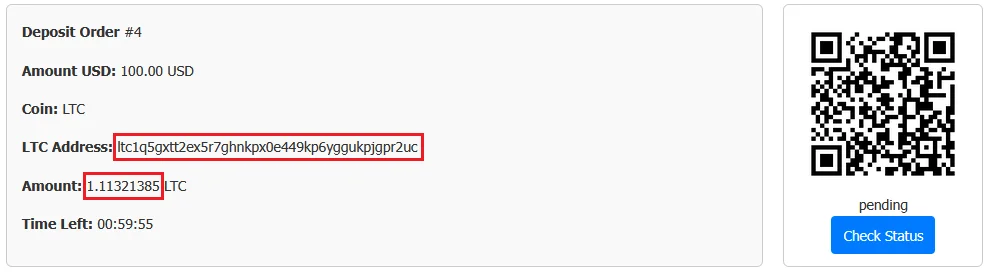
2. Buy LTC via a payment gateway
- Visit Swapped.com
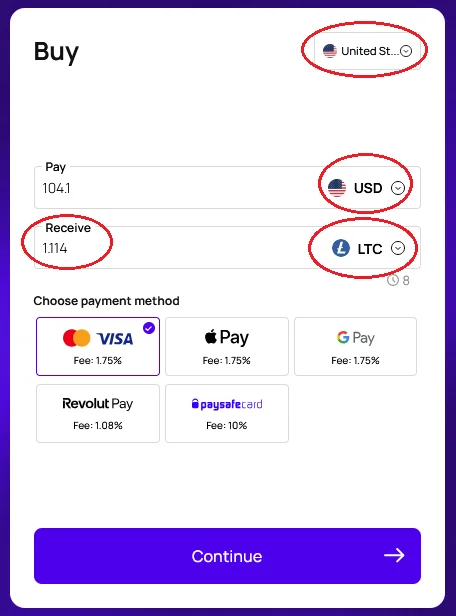
- Select your country and currency (e.g., USD).
- Receive: Select LTC as the coin.
IMPORTANT: Swapped only allows 3–6 decimal places. Round up if necessary to ensure the system receives enough crypto (e.g., 1.11321385 LTC → 1.114 LTC).
- Choose your payment method: Credit Card, Apple Pay, G-Pay, etc.
- Click Continue to next page
3. Send to the order address
- Enter your email and complete the KYC process if requirement.
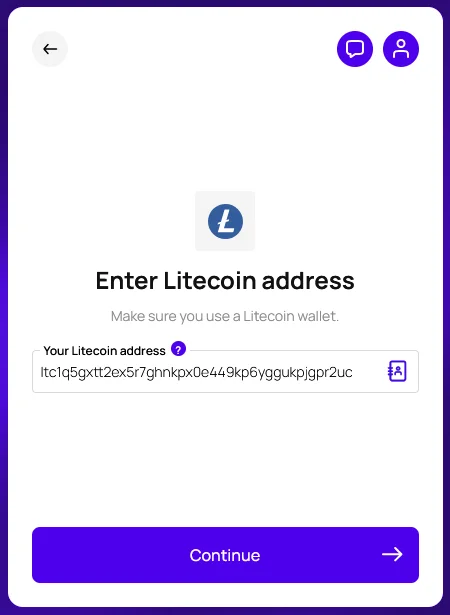
- VERY IMPORTANT: Enter the order’s LTC address exactly as shown on the checkout page.
- Do NOT send to your personal wallet first, because sending through your wallet incurs a second network fee → the received amount may be insufficient → payment will not verify automatically.
- Waiting email from Swapped.com complete payment.
- After receive verified email from Swapped.com, return to [P𝒵 Checkout Page]: https://dazposer.net/index.php?do=pointsystem&action=checkout&order_id=YOUR_ORDER_ID and click Check Status. If it shows Success, your P𝒵 balance has been credited.
B. If You Already Have Crypto (BTC, LTC, BCH, or USDT BEP-20)
-
Create an order and select the amount and coin type.
-
Click Checkout.
-
Send the exact amount to the order address.
-
For USDT: Only use BEP-20. Sending via another network may result in lost funds.
-
Incorrect address or amount will result in lost funds or failed verification; manual admin support will be required.
-